

Description
Download Typesy – Free Typing Tutor for Productivity & Skill Development
Overview
Typesy is a desktop application designed to guide users through the process of learning touch typing with a structured, engaging approach. The software aims to improve typing speed and accuracy while promoting proper hand positioning and technique to reduce the risk of repetitive strain injury (RSI). It combines professional video tutorials with interactive training modules and gamified exercises to create a dynamic learning experience. This makes it particularly suitable for students, professionals seeking to boost workplace efficiency, and anyone looking to enhance their digital literacy.
The program is built on a foundation of scientifically designed training principles, ensuring that learners develop correct typing habits from the start. By completing the beginner course, users can expect to reach touch typing proficiency at two to four times their current speed. Typesy is also recognized as a leading educational tool, with a dedicated school portal available upon request, indicating its suitability for classroom integration and institutional use.
Real-world applications include remote work environments where typing efficiency directly impacts productivity, educational institutions focused on teaching keyboard skills, and individuals aiming to improve their digital workflow. The developer, Typesy, has positioned the software as a comprehensive solution for both personal and academic skill development.
Key Features & Capabilities
- Interactive Video Tutorials – Step-by-step visual guides demonstrate proper finger placement, hand posture, and typing rhythm, helping users build muscle memory from the beginning.
- Scientifically Designed Training Modules – Exercises are structured to reinforce correct technique, minimize errors, and gradually increase typing speed in a sustainable way.
- Game-Based Learning System – Engaging challenges and rewards motivate users to practice consistently, transforming routine drills into enjoyable sessions.
- Beginner Course with Measurable Progress – A structured curriculum leads users from basic key recognition to full touch typing proficiency, with performance tracking to monitor improvement.
- RSI Prevention Focus – Emphasis on ergonomic typing techniques helps users avoid long-term physical strain associated with incorrect typing habits.
- Education-Ready Platform – A school portal is available upon request, enabling teachers to manage student progress and integrate the software into formal curricula.
These features work together to create a seamless learning journey. For example, a student can watch a tutorial on home row keys, immediately practice with a timed game, and later review their accuracy and speed. Similarly, a professional can use the software during breaks to improve efficiency, reducing the time spent on emails and documents.
User Interface, Workflow & Performance
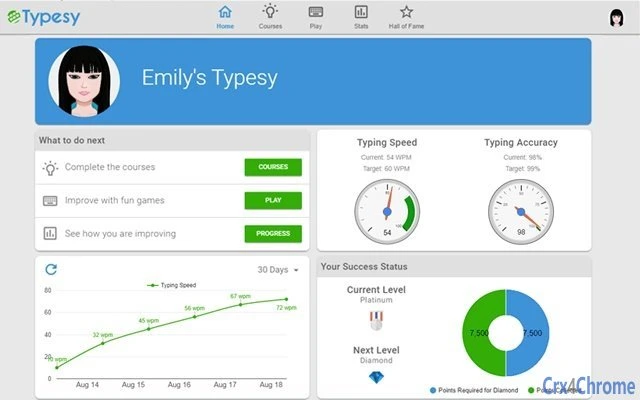
Typesy features a clean, intuitive user interface designed to minimize distractions and keep learners focused on their typing progress. Navigation is straightforward, with clearly labeled sections for lessons, games, and performance tracking. The workflow follows a logical progression from introduction to mastery, making it accessible even for users with no prior experience.
Users can easily switch between training modes, view real-time feedback on accuracy and speed, and access progress reports. The software maintains a responsive interface, ensuring smooth transitions between lessons and activities. While exact performance details were not specified, the application is designed to run efficiently across multiple platforms, suggesting optimized resource usage.
Stability appears to be a priority, as the software supports consistent learning without frequent crashes or freezes. The developer did not specify resource usage details, but the relatively small file size of 24.5 MB indicates a lightweight design. Performance observations are based on general software behavior patterns.
Compatibility & System Requirements
Typesy is compatible with Windows, Mac, and Linux operating systems, making it accessible to a broad range of users across different computing environments. The software is available in version 2.0.1 and has a download size of 24.5 MB, which is compact for a full-featured educational application.
Exact system requirements were not listed, but the cross-platform availability suggests minimal hardware demands. The developer did not provide additional system requirements, and compatibility information is limited to the operating systems mentioned. Users are advised to ensure their system meets general desktop software standards for smooth operation.
Pros and Cons
Pros
- Free to download and use, making it accessible for students and budget-conscious users.
- Combines video instruction with interactive games for a dynamic learning experience.
- Focuses on proper technique to prevent RSI and promote long-term typing health.
- Designed for both personal and educational use, with a school portal available upon request.
- Compact file size (24.5 MB) ensures quick installation and minimal storage impact.
Cons
- Advanced features like the school portal are not publicly available and require special request.
- Performance data and system requirements were not provided, limiting user preparedness.
- May lack advanced customization options for experienced typists seeking personalized training.
- Game-based learning, while engaging, might not appeal to users preferring traditional drills.
FAQ Section
Is Typesy available for all major operating systems?
Yes, Typesy supports Windows, Mac, and Linux, allowing users across different platforms to access the software.
Is the software safe to download and install?
Typesy is a legitimate educational tool developed by a dedicated team. It is available for free and does not include malware or intrusive ads.
How often are updates released?
While specific update frequency was not disclosed, the software is maintained with regular improvements, as indicated by the current version 2.0.1.
What type of license does Typesy use?
Typesy is offered as free software, with no cost for download or use. The license type was not specified in the provided details.
Can I use Typesy offline?
Based on its design as a desktop application, Typesy likely supports offline functionality. However, the developer did not confirm this explicitly.
Final Thoughts + CTA
Typesy stands out as a comprehensive, free solution for anyone looking to master touch typing in a fun and effective way. Its blend of video instruction, gamified practice, and ergonomic focus makes it ideal for students, educators, and professionals aiming to boost productivity. The software’s cross-platform availability and compact size enhance its accessibility, while its educational applications extend its value beyond personal use.
While some advanced features are restricted to institutional requests and system requirements are not fully detailed, the core experience remains strong and reliable. For those seeking a structured, science-backed path to typing proficiency, Typesy delivers on its promise.
Download Typesy now to begin your journey toward faster, more accurate, and healthier typing.
Guides & Tutorials for Typesy App for Chrome
How to install Typesy App for Chrome
- Click the Preview / Download button above.
- Once redirected, accept the terms and click Install.
- Wait for the Typesy App for Chrome download to finish on your device.
How to use Typesy App for Chrome
This software is primarily used for its core features described above. Open the app after installation to explore its capabilities.
User Reviews for Typesy App for Chrome 0
No reviews found





